
 English
  Arabic
  French
Table of Contents
How to Get Started with X.Sera #
Ready to power up your academy with AI? Follow these quick steps to access X.Sera and start building your knowledge base:
To work on this feature efficiently:
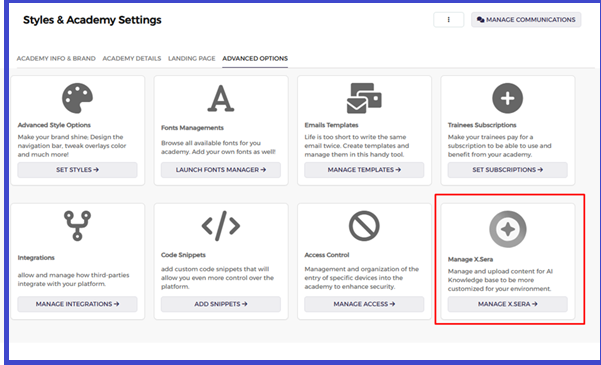
- Head to Your Settings First, look for Styles & Academy Settings in your main menu. This is your home base for personalizing the platform.
- Find the Advanced Section Once you’re in, click the Advanced Options tab at the top of the page to see the deeper customization tools.
- Look for the X.Sera Card. Keep an eye out for a card labeled Manage X.Sera. It’s easy to spot—just look for the little “+” icon in the bottom-right area.
- Open and Explore Click the Manage X.Sera button, and you’re in!
From here, you can start uploading content and teaching the AI exactly what it needs to know to support your students.


