
 English
  Arabic
  French
Table of Contents
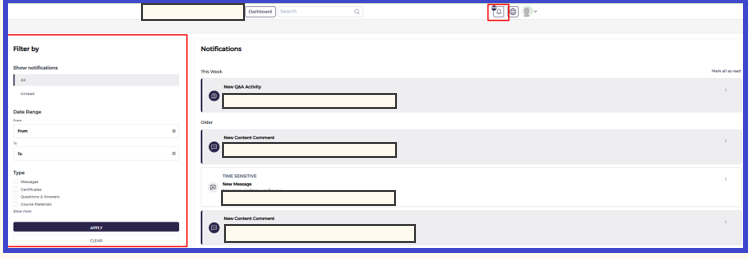
We’ve made it easy to keep up with everything happening in your academy. Think of this page as your personal mission control for staying connected with your trainees and your content.
- Your Activity Timeline: On the right side of the screen, you’ll see a live feed of your latest updates. Whether someone has asked a brilliant question in the Q&A, left a fresh comment on a lesson, or sent you a direct message, it will all show up here in real-time.
- Find Exactly What You Need: Use the Filter by panel on the left to cut through the noise. You can quickly sort your alerts by:
- Status: See what’s new versus what you’ve already handled.
- Date Range: Look back at last week’s activity or focus on today.
- Type: Jump straight to just your messages or just your content comments.
Keeping Up with Your Notifications #
Stay organized and never miss a beat! Here’s how to find and manage your latest academy updates:
- Check the Bell Ready to see what’s new? Just click the bell icon at the top of your dashboard to jump straight into your notifications.
- Fine-Tune Your View On the left side, you’ll find a handy Filter panel. This is your best friend for cutting through the noise. You can sort by:
- Unread or All: Choose “Unread” to see what needs your attention right now, or “All” to look back at everything.
- Date Range: Want to see what happened over the weekend? Pick a specific timeframe to narrow things down.
- Notification Type: Looking for something specific? Check the boxes for Messages, Certificates, Comments, or Course Materials to see only those updates.
- Apply Your Settings Once you’ve picked your filters, just hit Apply to refresh your list. If you want to start over and see everything again, simply click Clear.
- Browse and Act Your personalized list will appear on the right, neatly organized by time (like “This Week” or “Older”). Just click on any notification to dive into the details or respond!
Tip: > Frequent filtering is the secret to staying organized! It’s the fastest way to spot unread messages and keep your academy running smoothly.


